
Historical interview: The following preserves the research experiences and personal views expressed in the original manuscript.
Welcome to this Boke interview. This time, we are talking about how to make a good PowerPoint presentation! As we all know, PowerPoint has become a very important and effective tool for presenting academic research. What useful tips can we learn for making an excellent presentation? In this interview, we have invited three PhD researchers to explain techniques and methods for creating and delivering PowerPoint presentations.
Preparing the Content
When we make a PowerPoint presentation, what should we pay attention to when preparing its content?
PhD 1: When presenting content in PowerPoint, we ask you to make your main points clear and prominent. Focus on the points you want to communicate, rather than putting everything you have done on the slides. You must be willing to remove all content that is unrelated to your main points.
Second, quality matters more than quantity. In a 15-minute presentation, generally it is enough to explain one point clearly. In a 45-minute specialist thesis defense, explaining three points clearly is already very good. When preparing your content, do not try to cover too much. Instead, explain the part you most want to discuss clearly and thoroughly. Your approach must start from the audience, rather than from your own enjoyment. You cannot say, 'Whether or not the audience understands, I am enjoying myself as the speaker, and I have explained it to my own satisfaction.' That is unacceptable.
Everything we say and show is intended to help the audience understand what we want them to understand. It all serves the content, so please remember that.
Here is a small exercise we recommend and often do in our laboratory. After finishing a presentation, whether it has 15 or 45 slides, distill it into just 1–2 slides. Then remove all the content that is not shown on those 1–2 slides.
The Logical Structure
Our PowerPoint presentations usually have a logical structure running throughout. What advice do our PhD guests have for practicing this aspect?
PhD 2: Often, after finishing a presentation, I feel that mine is the best in the entire universe. But once I give it a run-through, I discover breaks in the chain of reasoning. The cause-and-effect relationships do not quite work. It is like a person whose head and body have no neck connecting them. Many times, after hearing my presentation, my supervisor tells me what content to add at a particular point, or where to move a section, so that the chain of reasoning flows properly. Otherwise, other people will find it baffling.
So I suggest that, after finishing your presentation, if you do not know where to make changes, run through it from beginning to end again. Check whether the chain of reasoning flows, and then write your script or revise the details.
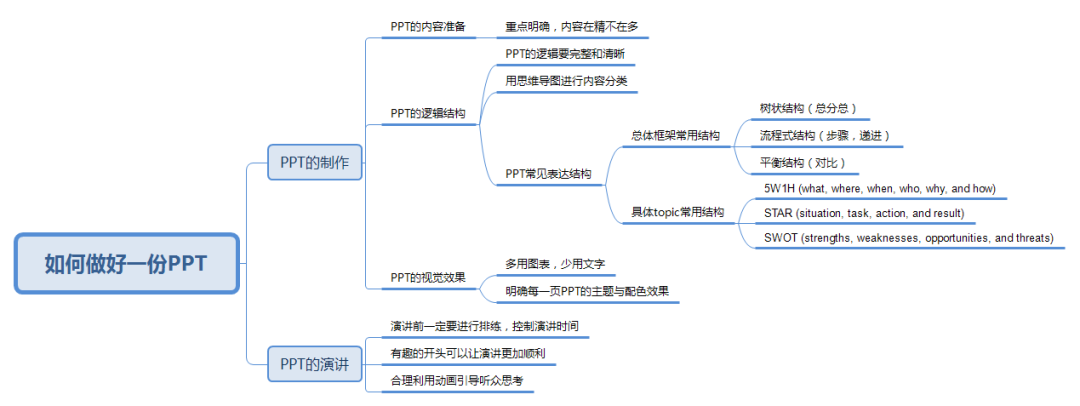
PhD 1: When preparing the logical structure, first decide on the content, then classify it in detail and organize it into levels. On that basis, we can draw a mind map and use it to decide the logic we want to present. That logic must be clear enough for the audience to see at a glance what you want to discuss and how you are thinking. We usually turn our mind map into a framework and put it at the beginning of the presentation, so the audience can follow our thinking. You can also learn some common methods for presenting information in a structured way. There are many books on the subject.
Common structures for the overall framework include a tree-like overview–details–overview structure; process structures, mainly for presenting steps or a progression; and balanced structures, mainly for comparing relationships.
For particular topics, we can use the 5W1H, STAR, or SWOT structures. If you are interested, you can look into these.
In our laboratory, we often practice logical structure by drawing mind maps. When you want to discuss a topic and have prepared and classified the content, draw a mind map. Check whether all the points you want to discuss are on it, and whether they have been developed to sufficient depth.
Visual Presentation
One of PowerPoint's main purposes is to show our experimental results, so its visual effect is very important. How can we give our presentations a good visual appearance?
PhD 1: For visual presentation, we generally have a customized standard template in our laboratory. Since most of our presentations are academic, we want them to convey professionalism and have an overall style consistent with the topic we are discussing.
PowerPoint slides should also look attractive. Beauty is a broad concept, but the most basic requirements are consistent formatting and fonts. The layout and color scheme must coordinate with the content as a whole. Any figures and tables we use must be high resolution, and we must make sure they also coordinate with our template and formatting.
Another point often emphasized in our laboratory is to use as little text as possible whenever we can express something with figures or tables. For example, to show a process, we make an animated diagram so that the audience can understand the process at a glance, rather than having to read a pile of text. To present an algorithm, instead of confronting the audience with a mass of equations that makes their eyes hurt and their heads spin, we can draw a diagram of the algorithm and explain it using concise text and equations alongside the diagram.
We also often emphasize that academic presentations should avoid flashy animations that require lots of clicking. They may look spectacular, but they do not convey professionalism, so we generally use animations sparingly. Our supervisor also often stresses the word count: on a slide, there should not be a single word too many or too few. If you remove a word, the meaning becomes incomplete; if you add one, it becomes redundant. Of course, this is a perfectionist trap, but as a general rule, we use no more than 50 English words per slide and a font size of at least 18, to make the slide easy for the audience to read. As for the presentation's length, an average of one slide per minute is generally suitable. For a 10–15-minute conference presentation, we usually have around 12 slides, with no more than 15. This total includes the title slide and any slides connecting the sections. For a specialist thesis defense, generally lasting 45 minutes to an hour, we normally keep the presentation to no more than 60 slides.
For visual practice, we often present our completed slides at laboratory group meetings, and the other lab members get together to critique one another's work. It is actually quite exciting; you can give it a try.
PhD 2: Every slide should have a clear theme, and its text and images should be large enough. Each slide has something of its own to communicate. It should neither contain too much nor be too empty. Ideally, the font and image sizes should make the audience comfortable. Do not try to cram all your content onto a single slide; your audience will be very confused.
Be careful when choosing colors, too. Sometimes we want to be innovative or emphasize something, and we go overboard with odd color combinations, such as red text on a black background. But the audience may find it strange and very uncomfortable to look at. Some supervisors in certain countries may also be quite sensitive about particular color combinations, so you must pay attention to your color choices.
Speaking and Delivery
Now that we have discussed content preparation, logical structure, and visual presentation, what other details should we pay attention to when delivering a PowerPoint presentation?
PhD 1: We need to pay attention to some details when speaking. Our main purpose is to explain clearly, so that the audience understands what we want to communicate. When preparing our talk, we should think from the audience's perspective about how to explain it clearly. We should not assume, 'It looks clear to me, and my explanation has a logical structure.' This may leave the audience thoroughly confused. So, when preparing, always think from the audience's perspective about how to present what you want to communicate.
The second important point is that you must rehearse. We often feel nervous when speaking. If we do not rehearse and simply improvise on the day, we may end up reading directly from the slides. In that case, we might as well have a robot or a small animal standing there. So we must prepare and rehearse in advance, and practice how to give the presentation well. During the talk, make some eye contact with the audience and establish an emotional connection to improve the effect of your presentation.
Finally, it is very important to manage your time and avoid overrunning. For example, finishing a 15-minute presentation within 15 minutes can greatly improve its effectiveness and how well it is received.
An exercise we often do in our laboratory is called a three-minute talk. We explain a topic in 3 minutes by covering 5 points: the problem, purpose, methods, results, and conclusions. It is quite interesting, and you can try it if you would like.
PhD 3: I have three small suggestions for delivering a PowerPoint presentation. First, a reminder about the opening: make it interesting and useful, without specialist terminology or details. Although we are discussing academic talks, an opening that sheds the layer of technical detail may earn you extra points. Your audience may have just entered the room or finished listening to the previous talk. As speakers, we need to help them enter a new story. Here are two practical tips. First, use an interesting or powerful opening to begin your talk and quickly attract everyone's attention. Second, introduce your content using a very simple concept that even a secondary-school student can understand, allowing the audience to make the transition easily.
Second, use animation appropriately to guide the audience's thinking. Have you ever seen slides so crammed with content that you did not know where to look? Having a lot of content is not itself a problem, but as speakers we need to guide the audience's thinking. We can use simple animations appropriately to help them move smoothly through our story.
Third, consider including a few jokes in a long talk. No matter how passionate the speaker is or how astonishing the results are, might a talk lasting nearly an hour still make you drowsy? And as the speaker, might you become increasingly tired as you speak? At certain points, we can plan a few small jokes or share stories from collecting the data. This keeps both sides engaged and makes the talk more vivid, human, and full of life.
That concludes today's discussion. If there are other topics you are interested in, please leave a comment! See you next time!
Sources and editorial history
Restored from a complete interview manuscript retained by the PhDSciNet Official Account. The original publication date remains unverified.